If you've worked with APIs, email attachments, or embedded images in CSS, you've probably run into a long string of letters and numbers ending in one or two = signs. That's Base64 — and despite looking like encryption, it isn't one at all.
What Base64 Actually Does
Base64 takes binary data (like an image file, or any raw bytes) and converts it into a string made up only of letters, digits, +, /, and padding = characters. That's it. It doesn't compress the data, and it doesn't secure it — anyone can decode Base64 back to the original bytes instantly, with no key or password required.
The reason this conversion is useful is that a lot of older systems — email protocols, certain text-based data formats, URL query strings — were only designed to reliably carry plain text characters. Raw binary data can contain byte sequences that break those systems: control characters that get interpreted as commands, byte values that some transport layers alter or strip entirely, sequences that terminate a message early. Base64 sidesteps the problem by representing everything as safe, printable text, guaranteed to survive being passed through systems that were never designed to handle arbitrary binary.
Where Base64 Actually Came From
Base64 isn't a modern invention — its most common use case traces back to email in the early 1990s. Internet email was originally designed to carry 7-bit ASCII text, a leftover constraint from older telegraph and teletype systems. That worked fine for messages, but it meant attachments — images, documents, anything binary — couldn't be sent reliably, since many mail servers along the way would strip the 8th bit of every byte, silently corrupting anything that wasn't plain text.
The MIME standard (Multipurpose Internet Mail Extensions) solved this in 1992 by defining Base64 as one of its standard content-transfer encodings: a way to represent any binary attachment using only the safe 7-bit characters every mail server could pass through untouched. That original use case — packaging binary data so it survives systems built only for text — is still exactly why Base64 gets used today, just in a lot more places than email.
Common Situations Where You'll See It
- Email attachments. Email was originally a text-only protocol. Attaching a photo or PDF means encoding it as Base64 text first, then decoding it back to binary on the receiving end.
- Embedding small images directly in CSS or HTML. Instead of linking to a separate image file, you can embed a Base64-encoded version directly in a
data:URL, saving an extra network request for very small icons. - API tokens and Basic Auth headers. HTTP Basic Authentication sends
username:passwordas a Base64 string in the request header. It's not encryption — it's just packaging the credentials as text-safe data, which is why Basic Auth should only ever be used over HTTPS. - Storing binary data in JSON. JSON doesn't have a native binary type, so binary data (like a small file or a cryptographic signature) often gets Base64-encoded before being placed into a JSON field.
- Embedding fonts and small assets in stylesheets. A
@font-facedeclaration can point to a Base64-encoded font file directly inside the CSS, which is occasionally used to avoid an extra request for very small subset fonts. - Passing binary data through text-only configuration systems. Environment variables, certain CI/CD secret stores, and some config file formats only reliably accept text, so binary certificates or keys are often Base64-encoded before being stored there.
A Closer Look at the Math
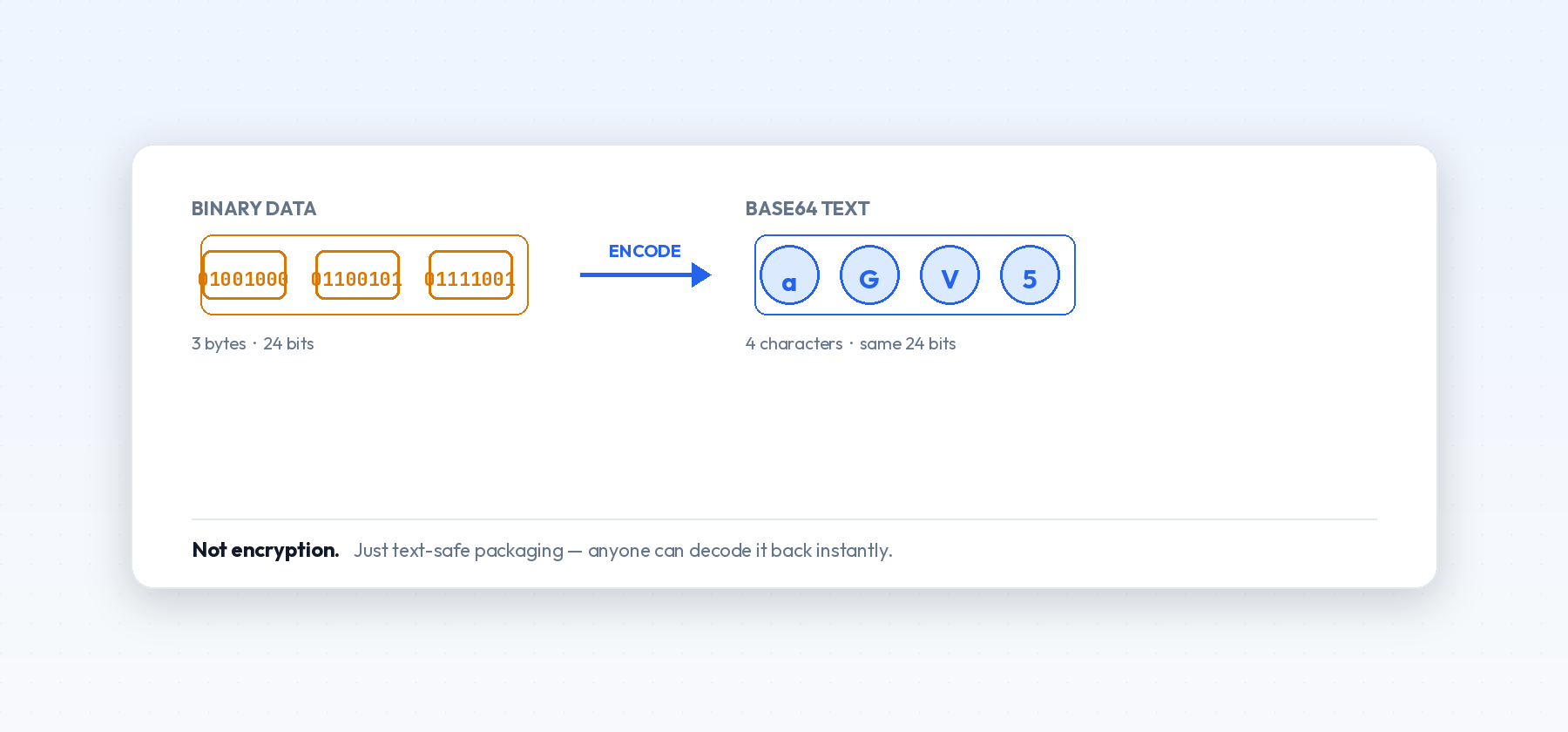
Base64 works by taking 3 bytes of input (24 bits) and re-grouping those same 24 bits into 4 chunks of 6 bits each. Each 6-bit chunk can represent a number from 0-63, which maps to one character in Base64's 64-character alphabet (A-Z, a-z, 0-9, +, /). That's where the name comes from — 64 possible symbols, hence "Base64."
This is also exactly why the output is always about 33% larger than the input: 3 bytes of binary data become 4 characters of text, and 4 is exactly one-third larger than 3. When the input length isn't a clean multiple of 3, = padding characters get added at the end to keep the output length a multiple of 4, which is also why you'll sometimes see one =, sometimes two, and sometimes none at all at the end of a Base64 string.
URL-Safe Base64
Standard Base64 uses + and / as two of its 64 characters, and both of those already mean something specific inside a URL — + often represents a space, and / separates path segments. Putting standard Base64 directly into a URL without adjustment can silently corrupt it.
To get around this, a variant called URL-safe Base64 swaps + for - and / for _, and often drops the = padding entirely since it's not strictly required if both sides agree on how to handle it. This variant shows up constantly in JWTs (JSON Web Tokens), where each of the three dot-separated sections is URL-safe Base64, and in various API tokens designed to be passed as URL query parameters. If you try to decode a JWT with a standard Base64 decoder and get an error, this mismatch is almost always why.
What Base64 Is Not
This is the part that trips people up most: Base64 is not encryption, and it's not compression.
- It's not encryption because anyone can decode it without a key — it's a public, reversible transformation, not a secret one. If you see credentials or sensitive data as Base64 anywhere, treat it as visible plain text, not as something protected. A password Base64-encoded and stored in a config file is exactly as exposed as if it were stored in plain text right next to it.
- It's not compression because Base64 output is actually about 33% larger than the original binary data, as covered above. You use it for compatibility with text-only systems, not for saving space — if anything, it costs you space in exchange for that compatibility.
A Quick Way to Tell If Something Is Base64
Base64 strings only use a specific, small set of characters (A-Z, a-z, 0-9, +, /, or -, _ for the URL-safe variant), the total length is always a multiple of 4, and they're often (but not always) padded at the end with one or two = signs. If you see a long string matching that pattern, especially inside an API response, an email header, or a data URL, it's very likely Base64.
Common Mistakes When Working With Base64 in Code
A handful of issues account for most Base64-related bugs:
- Mixing standard and URL-safe variants. Encoding with one alphabet and decoding with the other produces garbage output or an outright error, since
+/-and//_occupy different positions in each alphabet. - Forgetting the
data:URI prefix when embedding images. The Base64 string alone doesn't tell a browser what format it's decoding — thedata:image/png;base64,(orimage/jpeg,image/webp, etc.) prefix is what makes it renderable. - Double-encoding. Accidentally running Base64 encoding twice on the same data — often from a library or framework encoding automatically, followed by a second manual encode — produces a valid-looking but completely wrong string that fails to decode into anything usable.
- Truncated strings from copy-paste or database field limits. Base64 strings for anything beyond a tiny icon are long, and it's easy for part of one to get silently cut off, especially by an older database column with a length limit that was never updated.
Encoding and Decoding Without Installing Anything
You don't need a programming environment to work with Base64 day-to-day. The Base64 Encoder/Decoder handles both directions directly in your browser — paste in text or a file to encode it, or paste in a Base64 string to decode it back to its original form, with nothing uploaded to a server.